





Test it before anyone depends on it
Run the automation in Sandbox against payloads you keep, and read what every step produced before a version goes anywhere near live traffic.
Low-code automation platform
Build the automations your business runs on — across your apps, your database and your own APIs — with branching, tables, Python, AI and a person in the loop where you need one. Test every version before it ships. Open any run months later.
Free for 150 runs a month — a whole automation is one run, however many steps it has. No card, no sales call.
run_8f6b9118:41:055 steps · 2 outbound calls · no retries
lead routed to #leads · billed once
Billed by run, not by step. Tested before it ships. Traced after it runs.
What you can build
This is the product canvas, not a diagram drawn for a landing page. Pick one and watch it run.
Build with AI
Write what you want decided in a sentence and an agent builds it on the same canvas you would have used. It asks when a choice is genuinely yours to make, it tests what it wrote, and it leaves you a draft — never a live version.
Say what you want decided, what it may look at, and the rules that matter. Attach a real payload if you have one — a JSON body, a spreadsheet, a screenshot of the form — and the agent reads that too.
Stop 01 of 06, Describe the decision. The walkthrough highlights Send.
Give the agent the outcome, the information it can use, and any rules that matter.
When a support ticket arrives, summarise it, tag the area, and open a case for the urgent ones.
Attach files JSON, CSV, TXT, HTML, PDF, PNG, JPG, WEBP, DOCX, DOC, XLSX
Bring your own agent
Give an agent one remote server and the permissions you choose. It can call published flows, read the workspace context, and build and test drafts without being allowed to publish or touch live traffic.
See how MCP works and connect itapi.arborule.com/mcpflows · authoring · testingThe parts
A step is not only "call this app". It can be a branch, a table your operations team edits, a query against your own database, a model, or a person.
A Custom Connection speaks any HTTPS or JSON API you have credentials for, so the list below is a convenience and never the ceiling. Fifty-seven providers are packaged with their operations already described, and six databases connect directly.
AI steps and agents
An AI step reads free text — a ticket, an email, a PDF — and returns the exact fields you asked for, so the next step can branch on them. An agent goes further: a standing brief, a set of tools it may use, and a required output shape.
Define the task, the hard rules and the examples once, in a reusable prompt.
Give it a calculator, web access, your files, a published flow, or another agent.
Require a structured output schema. A response that does not match is retried, not passed on.
Every iteration, every tool call and every retry is recorded with its tokens, its latency and its cost — so an agent is a step you can audit rather than a black box you hope about.
v2·gpt-5.4-nano·Agent Tool
severityURGENTareabillingsummaryCard charged twice on renewalPeople in the loop
A flow can open a case mid-run and carry on to its last step — nothing waits. The case takes the human work from there, under a blueprint your team versions and publishes, and it stays pinned to the version it was opened under for its whole life.
Complete 1 required task to unlock actions.
When something breaks
A timeout, a 429, or any 5xx from the service you are calling is retried on a widening gap that spans a little over 24 hours. That is long enough to survive a maintenance window without hammering a service that is already struggling.
When the last attempt fails, your workspace admins get an email naming the endpoint, the event and the response code — once per endpoint per day, so a dead URL on a busy flow does not turn into a thousand messages.
Retries are free. A run that took six attempts to deliver is still one run.
Why it stays working
Most automation tools give you one live copy that everyone edits. That is fine until the automation matters — and then a Tuesday afternoon change is the reason Friday's orders never reached the warehouse.
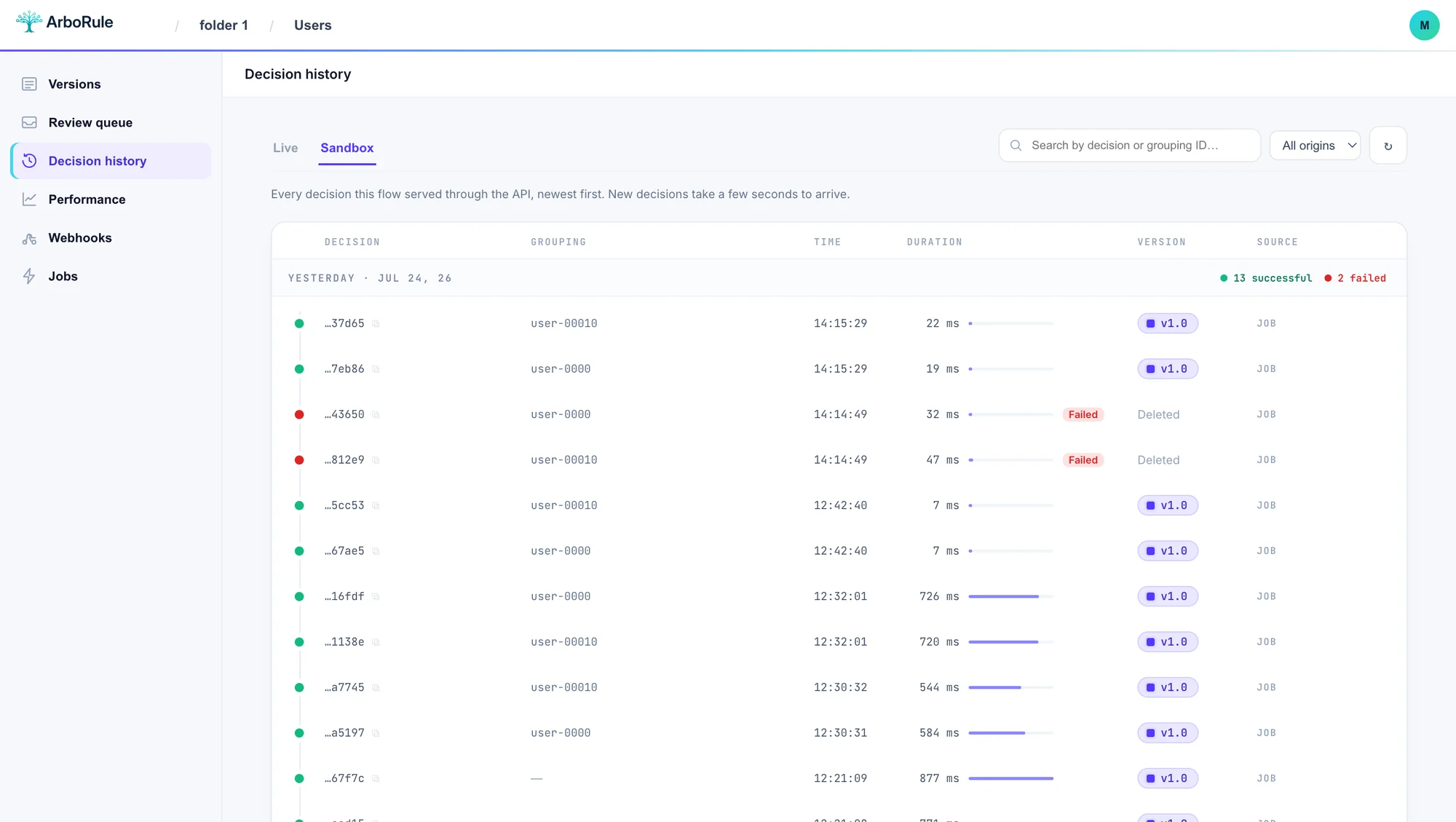
Run the automation in Sandbox against payloads you keep, and read what every step produced before a version goes anywhere near live traffic.
Live traffic runs a published version. Editing the draft changes nothing that is running, so a half-finished change cannot leak into production.
Send a percentage of runs to the new version and the rest to the old one, or mirror live traffic onto a candidate in shadow mode and compare before you switch.
Every run keeps the version that served it, the path it took, and the value each step produced. Open run #8,412 from March and see exactly what happened.
Your credentials
Connection settings — API keys, database passwords, webhook secrets — are encrypted in the database with keys held outside it. They are decrypted to make the call your flow asked for and for nothing else.
A new key is shown to you once. What the database keeps is a SHA-256 digest and the first eleven characters, which is enough to name the key in a log and not enough to use it.
A draft cannot touch live traffic, and live traffic only ever runs a published version. Testing an automation and running it are two different environments, not two intentions.
Bring your identity provider and let it own who has access. Available with granular workspace permissions on the decisioning plans.
Pricing
Tools that bill per step, per task or per operation make you pay for how you built the automation. A run here is one execution of a published version, start to finish. Splitting a step in two does not change your bill.
1 run counted
Take that automation, run 2,000 times in a month.
Split a step in two here and nothing changes. That is the whole difference, and it is why the plans below are quoted in runs.
150 runs / month
Unlimited testing in Sandbox on top of the allowance. No card to start.
1,000 runs / month
For the first automations a team actually depends on.
4,000 runs / month
For a workspace running its operations on these.
15,000 runs / month
For automations carrying real volume across several teams.
Above your allowance, runs keep going at US$ 10 per 1,000 runs — nothing pauses, nothing queues, and no automation stops mid-month.
Coming from somewhere else
There is no importer for another vendor's file format, and we are not going to pretend otherwise — you rebuild the automation here. That takes an afternoon for most of them, and it is the only honest way to end up with something you can test and version.
If you already have ArboRule flows somewhere, those import directly, versions and subflows included.
Before you start
One run is one execution of a published flow version, from the trigger to the last step. A flow with three steps and a flow with thirty each count as one run, a branch that is not taken costs nothing, and a delivery that needed six retries is still one run. Sandbox runs and live runs draw from the same monthly allowance, so there is one number to watch. This is why an allowance quoted in runs is not comparable to one quoted in steps, tasks or operations: a seven-step automation is one unit here and seven there.
No. ArboRule is priced on runs, not seats. Everyone who touches the automation — whoever built it, whoever operates it, whoever gets paged when it fails — works in the same workspace without changing what you pay.
Three things. An HTTP call to the flow's own endpoint, which returns the result in the response. An Inbound Webhook node, which gives you a URL to hand to another service. Or a scheduled job, which reads rows from a database, an S3 bucket or an uploaded file and runs the flow over each one on the schedule you set.
Outbound deliveries are retried six times on a widening gap — immediately, then after 5 seconds, 30 seconds, 5 minutes, 1 hour and 23 hours — which spans a little over a day in total. If the last attempt still fails, your workspace admins are emailed with the endpoint, the event and the response code, throttled to one message per endpoint per day.
Yes. There are 57 packaged providers, and a Custom Connection speaks any HTTPS or JSON API you have credentials for. Six databases connect directly: Postgres, MySQL, Snowflake, BigQuery, Redshift and MongoDB.
Yes, and that is the point of the product. Build and run it in Sandbox as many times as you like, read what every step produced, then publish a version when it is right. Live traffic only ever runs a published version, so editing a draft cannot change what is already running.
Most of the category gives you one live copy of an automation that everyone edits, a linear list of steps, and a run log that answers whether it succeeded. ArboRule gives you a branching canvas, versions you publish, a sandbox you test in, traffic you can move a slice at a time, and a stored trace for every run showing the exact path and the value each step produced. If your automations are small and rarely change, that machinery is overhead you do not need.
Yes, in two shapes. A Create Case node opens a case in a queue and the run carries on to its last step, so nothing waits on a person. A Manual Review node pauses the run instead and resumes it from the same node once the reviewer answers. Both record what the person did on the same trace as the rest of the run.
Start with one
Create a workspace, wire up the automation you already worry about, and let the run tape tell you whether it is behaving.